The energy layer for AI datacenters

Your GPUs waste up to 30% of their power.

Pebble reclaims it — with zero SLA impact — and lets you spend it your way: deploy more GPUs, cut your power bill, or sell it back to the grid. Proven live on AMD Instinct™ MI350X.

Read-only assessment. No code changes. Deploys in minutes.

Partnered with

+86.5% throughput −17.5% power 0% SLA impact +2 GPUs per 6 deployed

Live on AMD Instinct™ MI350X. Production inference. No synthetic benchmarks.

AMD × Pebble · The shoutout

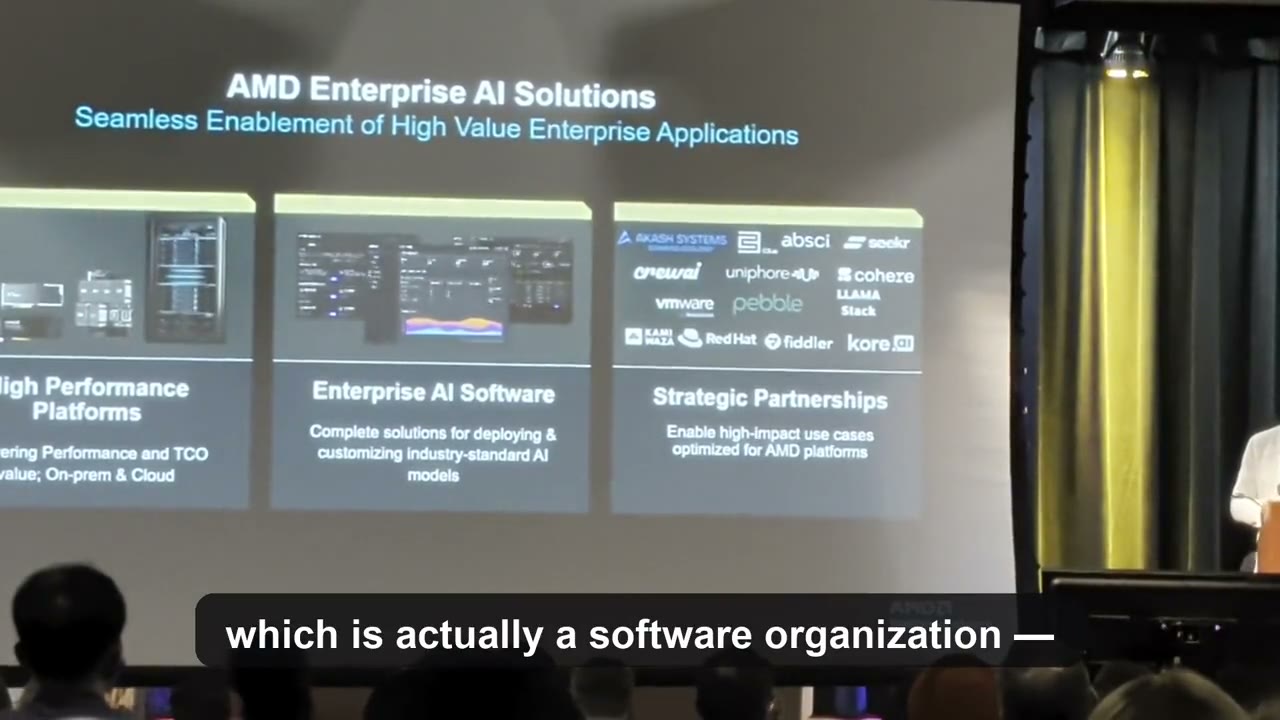
AMD shared our POC results on stage.

When AMD's Ted Marena gave an enterprise-AI keynote at Plug and Play San Jose, he spent several minutes of it walking the room through our joint POC on AMD Instinct™ MI350X at MiTAC Computing — and read the numbers off the slide himself. Watch the clip, then see the experiments behind it.

Validated on AMD Instinct™ MI350X MiTACComputing infrastructure partner

Experiment 1 · Llama 3.1 70B · 8 GPUs

Efficiency knee: 1,000 W → 825 W per GPU.

+86.5% throughput +82.4% tokens/watt −17.5% power 0% SLA impact

Experiment 2 · Llama 3.1 405B · oversubscription

Same strict 6 kW envelope: 6 GPUs → 8 GPUs.

+28% throughput +2 free GPUs 0% SLA impact

Zero application changes. Zero hardware changes.

Ted Marena on stage at Plug and Play San Jose, presenting Pebble 0:53

Joint announcement with MiTAC Computing · June 26, 2026

The power wall

You can't buy your way past the power wall.

AI growth isn't gated by chips anymore — it's gated by power. The megawatts you need to grow aren't available, and the ones you already have keep getting pricier and less predictable.

4–8 yrs

typical wait in a grid interconnect queue

Berkeley Lab →

95%+

datacenter occupancy in major markets — little room left

+75%

jump in grid power prices in a single year

20–30%

of GPU power burned past the efficiency knee for almost nothing

The fastest megawatt you'll ever get is the one you stop wasting.

How it works

Find the knee. Free the power.

Every GPU has an efficiency knee — the power level where extra watts stop buying real performance. Run past it and you're burning 20–30% of your power for almost nothing. Pebble profiles each workload in real time, finds that knee, and caps exactly there — continuously, per GPU, per job. Throughput holds. SLAs hold. The wasted power comes back as headroom you control.

Pebble · llama-3.1-70b · cluster-a POWER 742 W ↓ 25.8% vs default TOKENS/SEC 1,608 ↑ 86.5% vs default SLA 99.7% P99 within target TOKENS / SEC · LIVE 60-SECOND WINDOW LIVE

01 · Profile

Map each workload's efficiency knee in 10–30 minutes

Pebble runs alongside your serving stack (vLLM, SGLang, TRT-LLM) and continuously measures power draw, throughput, latency, and SLA compliance — per job, per GPU, per region.

  • Per-workload, per-hardware telemetry
  • No code changes, no model rewrites
  • Updates every few seconds, not every hour

TOKENS / WATT vs GPU POWER CAP tok/W 500W 700W 825W 925W 1000W SLA threshold Efficiency knee Default 1000W ↔ curtailable margin

02 · Cap at the knee

Enforce the optimal power level, never below it

Every workload, on every hardware config, has both. The efficiency knee is where tokens-per-watt peaks. The SLA threshold is the lowest cap that still hits SLA. Pebble computes both continuously — they drift as your traffic and model drift.

  • Workload-specific, hardware-specific, config-specific
  • Recomputed live; never trusts a static lookup table
  • The gap between them is your curtailable margin
SAME 6 kW ENVELOPE A · PACK MORE GPUs Cap each GPU at the efficiency knee GPU GPU GPU GPU GPU GPU +1 +1 +2 free GPUs B · FLEX POWER BACK TO THE GRID Operate inside the SLA threshold your workload SLA preserved grid signal < 30 s response utility grid ~100 GW available

03 · Reclaim

Get 20–30% of your power back as usable headroom

Cap each GPU at its efficiency knee → reclaim 20–30% of stranded TDP → fit more GPUs into the same kilowatt envelope. Or operate inside the SLA threshold → release power to the utility on grid signal, take it back later, no SLA breach.

  • ~100 GW of curtailable power waiting in the US grid
  • Same platform, same telemetry, two business outcomes
  • Sub-30-second response to utility curtailment signals
Industry signals

The constraint is power. The industry agrees.

Pebble's thesis isn't a contrarian bet — it's where the AI economy is heading. From the people running it.

“I actually think before we hit that, you're going to run into energy constraints.”

Mark Zuckerberg CEO, Meta Dwarkesh Patel Podcast · April 2024 View source →

“In the future, data centers are going to be thought of … as AI factories. Their goal in life is to generate revenues, in this case, intelligence.”

Jensen Huang CEO, NVIDIA GTC 2024 Keynote View source →

“A very clever, very interesting product, where they actually utilize AI and have our GPUs consume less power — but the performance per watt is increased.

Ted Marena AMD Plug and Play San Jose State · May 2026 Read the case study →
What you get

One reclaimed resource. Three ways to use it.

Grow

Deploy more GPUs in the megawatts you already have.

Fit +2 for every 6 — capacity you'd otherwise wait years for. The reclaimed power becomes room for more revenue-generating GPUs inside your existing envelope.

Save

Cut your largest controllable cost.

Pebble shaves the demand-charge peaks behind your “random” power-bill spikes — utilities bill on your single highest 15-minute peak, where 30–70% of the bill hides.

Earn

Turn idle headroom into revenue.

When the grid signals, Pebble flexes within your SLA bounds in seconds — qualifying you for flex-power contracts that pay you back through the grid.

Not just density

Plenty of tools promise more GPUs.

Pebble is the only energy layer that does all four:

Guarantees zero SLA impact — caps at the knee, never below it. 0% SLA cost in every test.
Is proven on AMD — validated live on Instinct™ MI350X. Runs on NVIDIA too.
Pays you back through the grid — a new revenue line, not just more GPUs.
Changes nothing in your stack — no code, no workload integration, mTLS by default.
Deployment & trust

Deploys in minutes. Changes nothing.

Kubernetes, Slurm, or Docker — a controller plus a node-level agent, installed in one command. Dry-run mode shows you the savings before you enforce a single cap. mTLS by default. Everything stays behind your firewall. Works with vLLM, SGLang, and TRT-LLM, on NVIDIA and AMD.

Kubernetes

helm install pebble/pebble
  1. Add the Pebble Helm repo and run helm install — provisions agents and controller across the cluster in a single command.
  2. A DaemonSet auto-places the agent on every GPU node via node selector. No per-node config.
  3. Apply a SonarPolicy CRD with dryRun: true to preview recommendations before enabling live caps.
Zero downtime mTLS Dry-run GitOps-compatible

Slurm / HPC

ansible-galaxy install pebble.agent
  1. Install the Ansible role from Galaxy and run the playbook against your cluster inventory. Works with any standard Slurm config.
  2. A root systemd daemon installs on every compute node. Auto-starts on boot — no manual restarts, no job disruption.
  3. Prolog/epilog hooks register each job for workload-aware optimization. Ships as a .sif Singularity image for air-gapped sites.
Air-gapped Singularity Slurm energy acct Dry-run

Docker

docker compose up -d
  1. Copy docker-compose.yml to each GPU node, or use the install script to push and configure across all nodes.
  2. Run docker compose up -d. Agent and controller start with health checks, auto-restart, and mTLS between components.
  3. A systemd unit wraps the stack for boot persistence. Set the controller address once per node — no further config needed.
Two-command mTLS Prometheus Dry-run
Compatible with

Drops into the stack you already run.

Pebble watches power and SLA from outside your serving loop — no fork of vLLM, no model rewrite, no special drivers.

Inference engines

  • vLLM
  • SGLang
  • TensorRT-LLM

GPU vendors

  • NVIDIA (CUDA)
  • AMD (ROCm)

Orchestration

  • Kubernetes
  • Slurm / HPC
  • Docker

About Us

At Pebble, our team is driven by a shared passion for solving hard engineering problems. We believe cloud infrastructure should be efficient, intelligent, and cost-effective. Our diverse team of AI, DevOps, and data center experts brings decades of experience to deliver a platform that drives real financial results.

Pradeep Gaddam

Pradeep Gaddam

CEO / CTO

Chet White

Chet White

Chairman

Keval Shah

Keval Shah

Chief AI Officer

Carl Page

Carl Page

Sustainability Advisor

Philippe Cousteau

Philippe Cousteau

Sustainability Advisor

Michael Tessler

Michael Tessler

Technical Advisor

Ravi Chandra

Ravi Chandra

Technical Advisor

Tim Profeta

Tim Profeta

Technical Advisor

FAQ

Questions engineering teams ask first.

Does sustained power capping degrade the hardware?

No. Power capping operates within the GPU's published voltage / frequency envelope — you're not undervolting beyond spec or pushing thermals. In practice, capping to the efficiency knee runs each die cooler than the default cap, which is the more common driver of long-term wear.

Independent studies on dynamic GPU power management have not found accelerated degradation from frequency / power-cap adjustments compared to running at TDP. See: Patel et al., POLCA (ATC '24) · Stojkovic et al., 2024 · Krzywaniak et al., SC '23. Vendor documentation (NVIDIA DCGM, AMD ROCm SMI) also describes power capping as a supported, in-spec operating mode.

How repeatable are the +82% tokens-per-watt numbers?

The headline figures (+86.5% tokens/sec, +82.4% tokens/watt at −17.5% power) come from a live pilot on 8× AMD Instinct MI350X at MITAC Computing, serving Llama 3.1 70B FP8 with vLLM — comparing the same vLLM configuration at the hardware-default 1,000 W cap vs. Pebble's 825 W efficiency-knee cap. The vLLM configuration is held constant between runs, so the gain is attributable to power management, not a serving-config change. Gains vary by model, batch profile, GPU SKU, and traffic mix — production deployments typically see 15–30% tokens/watt improvement with no SLA regression.

We run a representative job on your stack as part of every demo so the number you cite internally is your number, not ours.

Do I need to change my model code or inference engine?

No code changes. Pebble runs alongside vLLM, SGLang, TensorRT-LLM, and Hugging Face TGI as a Kubernetes operator, Slurm daemon, or Docker sidecar. It reads GPU telemetry (DCGM for NVIDIA, rocm-smi for AMD) and writes power caps via the same vendor APIs your ops team already trusts.

What happens during a grid-curtailment signal — do SLAs break?

Pebble Flex profiles every workload's SLA-breach cliff continuously — the lowest power level at which the workload still hits its latency targets. When a utility curtailment signal arrives, we never cap below that cliff. The fleet curtails toward it, holds, and restores within seconds of the signal lifting. Time-to-first-token may tick up briefly; SLAs do not break.

Which GPUs and orchestrators are supported?

NVIDIA Hopper (H100, H200) and Blackwell families. AMD Instinct MI300X and MI350X. Kubernetes (GKE, EKS, AKS, on-prem), Slurm, and bare-metal Docker. Full integration matrix and quick-start commands live in the deployment guide.

How long until we see results?

Sonar produces a complete efficiency-knee atlas for a workload in roughly 10–30 minutes of profiling. Flex requires a few hours of normal traffic to build SLA-cliff baselines across the fleet. Time-to-first- curtailment-event: typically the same day.

Who it's for

Built for operators living at the power wall.

Sold out and power-gated?

Grow your fleet without waiting years for the grid. Reclaim the power your GPUs waste and turn it into more billable capacity inside the megawatts you already have.

Margins under pressure?

Tame your power bill and protect every point of margin. Pebble shaves the demand-charge peaks that quietly set your monthly rate — no batteries, no SLA hit.

See how much power you're leaving on the table.

Run Pebble read-only for two weeks. We'll show you your efficiency knee, your reclaimable headroom, and exactly what it's worth — in more GPUs, a lower bill, or grid revenue.